
Postage Discount Authorizations
Leverage postage discount programs offered by mail carriers.
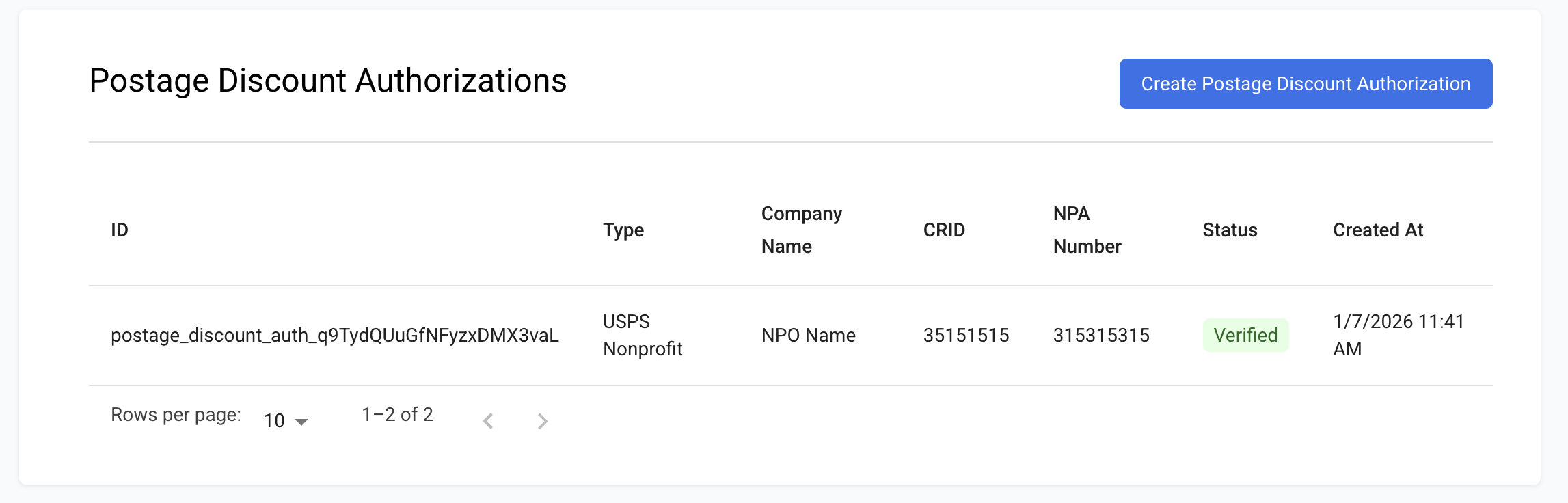
1. What is this feature?
Postage Discount Authorizations allow you to send mail at reduced rates by leveraging specific discount programs offered by mail carriers. These programs, such as those from USPS, Canada Post, and FedEx, offer lower postage costs for qualifying mailings (e.g., nonprofit mail). By registering your organization's authorization with PostGrid, you can seamlessly apply these discounts to your mail orders.
To get access to this feature, fill out this form, or contact our Sales Team at [email protected].
2. How can I use it?
Creating a Postage Discount Authorization:
- Navigate to Postage Discounts: From your PostGrid dashboard, go to Resources > Postage Discounts.
- Click the Create Postage Discount Authorization button.
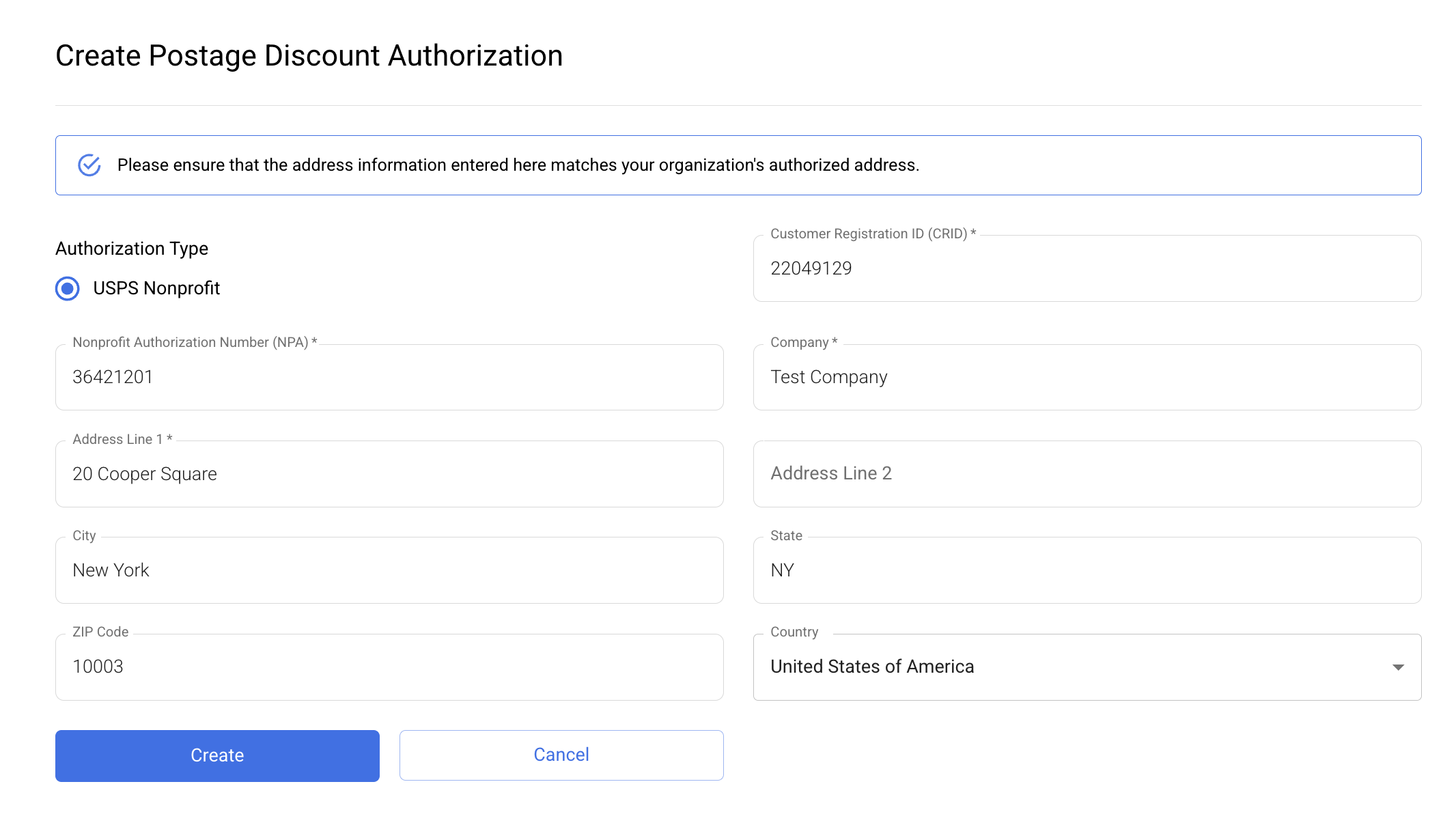
- Fill out the form:
- Authorization Type: Currently, only USPS Nonprofit mailings are supported, but more discount types are expected in the future.
- Customer Registration ID (CRID): Enter your organization's CRID, provided by USPS.
- Nonprofit Authorization Number (NPA): Enter the Nonprofit Authorization Number, also provided by USPS.
- Company: Enter your company's name exactly as it is registered with the mail carrier.
- Address Line 1 & 2, City, State, ZIP Code, Country: Enter your organization's authorized address exactly as it is registered with the mail carrier.
- Click Create.
Authorization Verification:
- Test Mode: In test mode, authorizations become "Verified" immediately after creation.
- Live Mode: In live mode, newly created authorizations will initially have a "Pending" status. They will become "Verified" once confirmed with the carrier.
Sending Mail with a Postage Discount Authorization:
After an authorization has been verified, you can use it when creating mail orders in place of a traditional sender contact via the dashboard or the API. Supported collaterals include letters, postcards, and self-mailers.
-
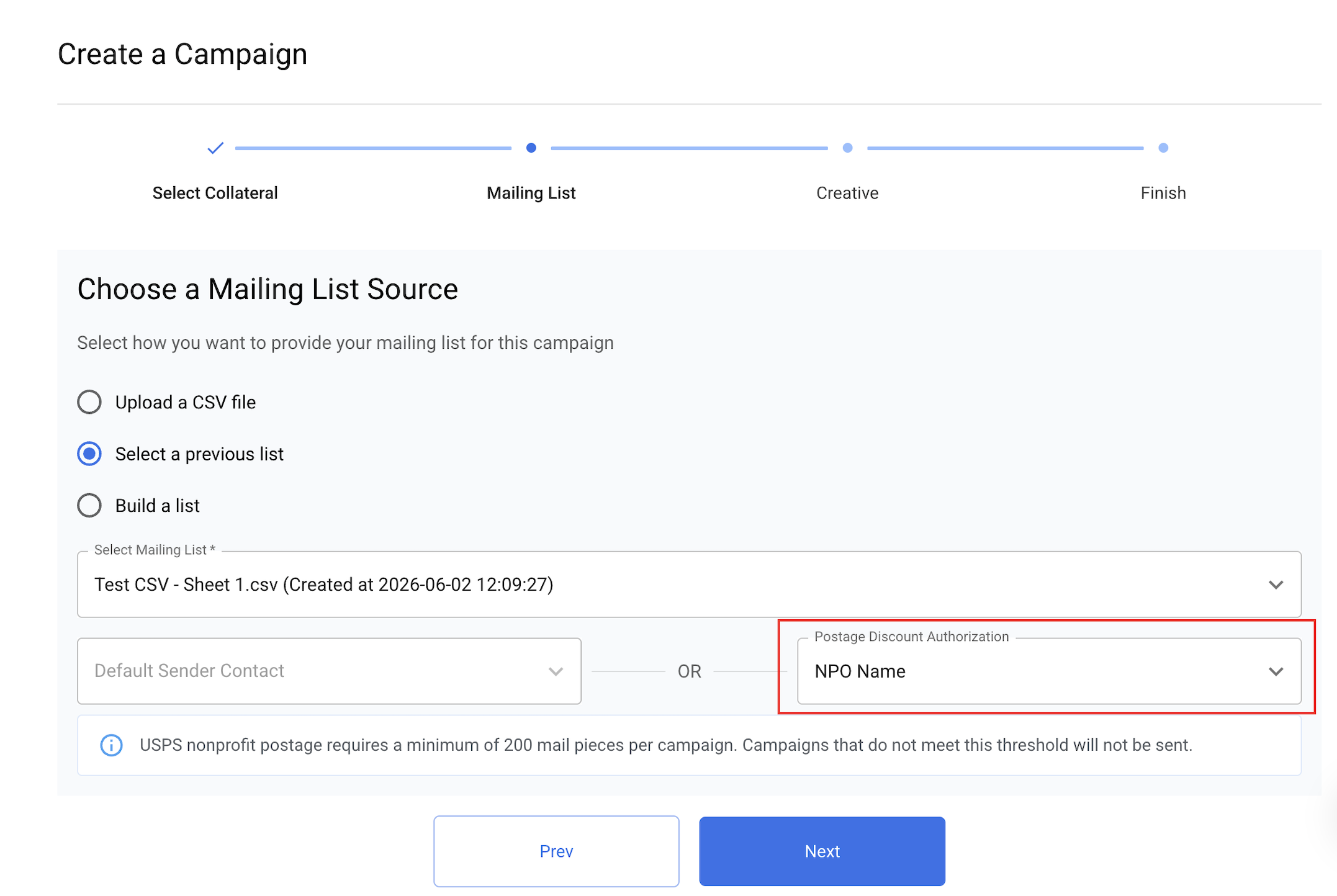
Campaigns: When choosing your campaign’s mailing list source on the dashboard, you will be prompted for either a Default Sender Contact or a Postage Discount Authorization. Select your verified PDA from the dropdown and proceed with creating your campaign. This can also be done through the API - omit the defaultSenderContact field in the campaign creation request body and include the PDA’s ID using the postageDiscountAuthorization field.
-
Individual orders: Applying a PDA to individual orders is only supported via the API - include the PDA's ID in the order creation request body using the postageDiscountAuthorization field. Note that the minimum order requirement of 200 mail pieces will still be enforced, so you will need to create at least 200 similar individual orders for the PDA to be applied to your mailings.
3. How do I get billed for it?
For specific pricing details, please contact your Account Manager or Customer Success Manager directly.
4. Sub-Organizations
- If you are a partner organization managing sub-organizations, each sub-org can use their own Postage Discount Authorization (PDA) with their own mail orders. To set this up, the sub-organization must first create their own PDA.
5. Obtaining a Nonprofit Authorization Number
If the sub-organization is applying for nonprofit postage pricing, they will need to obtain a Nonprofit Authorization Number directly from USPS.
- To do so, they should complete a non-profit form with the USPS, by following the instructions on the USPS Business Mail 101 Nonprofit Application page.
- Once the application is reviewed and approved by USPS, the sub-organization will receive their Nonprofit Authorization Number, which can then be used when creating their PDA.
FAQ
Q: What types of postage discounts are currently supported?
A: For now, only USPS Nonprofit mailings are supported. More discount types are expected in the future.
Q: Why must my address and company information exactly match what's registered with the mail carrier?
A: This is crucial for successful verification of your authorization. The mail carrier's systems will cross-reference the information you provide with their records. Any discrepancies could lead to rejection or delays in approval.
Q: What happens after I create a Postage Discount Authorization?
A: In test mode, authorizations become "Verified" immediately and can be used in test mode orders. In live mode, authorizations initially enter a "Pending" status while PostGrid verifies the information with the mail carrier. Once successfully verified, the status will update to "Verified."
Q: Can I use a "Pending" authorization for live mailings?
A: No, only "Verified" authorizations can be used for live mailings to ensure compliance with carrier regulations and to correctly apply the discounts.
Q: Where is the address from the authorization used on my mail pieces?
A: The address you enter for the Postage Discount Authorization will be used as the return address for your discounted mailings. This is a requirement for using carrier discount programs.
Q: Is there a minimum mailing volume required to use nonprofit postage discounts?
A: Yes. USPS nonprofit postage requires a minimum of 200 mail pieces per campaign. Campaigns that do not meet this minimum threshold may not qualify for nonprofit postage and may need to be sent using standard postage rates. This requirement is not enforced in test mode.
Updated 4 months ago