
White Label
White Label allows you to customize the PostGrid dashboard experience with your own brand identity.
This feature is ideal for:
- Resellers
- SaaS platforms embedding PostGrid
- Agencies managing mail for clients
To get access to this feature, fill out this form, or contact our Sales Team at [email protected].
White label setting are managed under Sub-Organizations menu, in the Settings page, under Brand Settings tab.
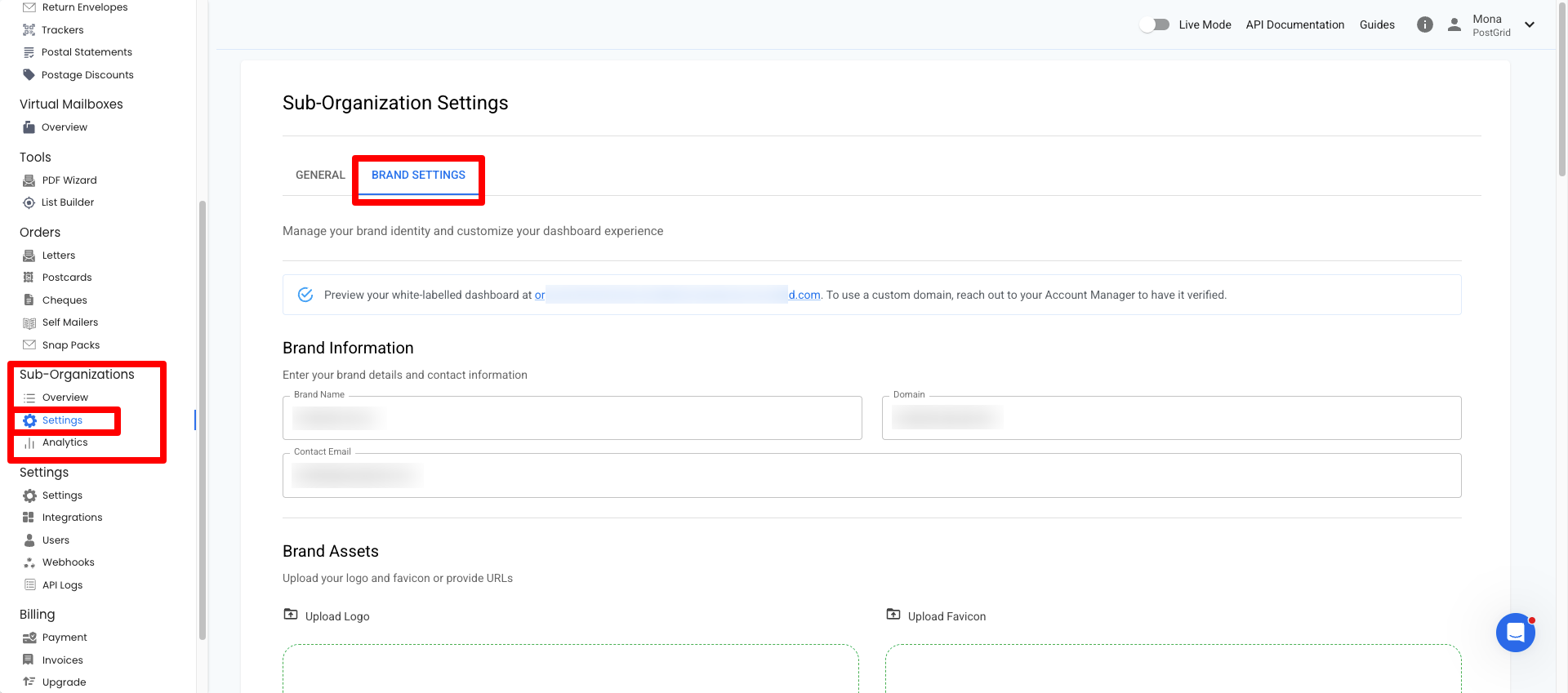
What You Can Customize
1. Brand Information
Define how your organization appears inside the dashboard.
- Brand Name – Displayed in the dashboard header.
- Domain – The URL where users access the dashboard (if configured).
- Contact Email – Used for brand-related communication.
2. Brand Assets
Upload visual assets for your branded experience.
- Logo (PNG or SVG recommended)
- Favicon (icon shown in browser tabs)
You can either:
- Upload a file
- Or provide a hosted URL
3. Theme Colors
Customize the dashboard color scheme using hex values.
Available fields:
- Primary
- Secondary
- Error
- Warning
- Info
- Success
- Text
These colors apply across buttons, alerts, and UI elements.
Use high-contrast combinations to ensure accessibility and readability.
4. Custom Links
Override default PostGrid links with your own URLs.
You can customize:
- Contact Us
- Getting Started
- Help / Support
- Talk to Sales
- KYC
- Blog
- Legal
- Address Changes
- Reports
- Webhooks
If a field is left blank, the default PostGrid link will be used.
5. Brand Preview
Before saving, you’ll see a live preview showing:
- Brand name
- Domain
- Logo
- Favicon
- Theme colors
This allows you to confirm styling before applying changes.
Custom Domain (Optional)
If you want users to access the dashboard via your own domain (e.g. mail.yourcompany.com):
- Enter the domain in the Domain field.
- Follow DNS setup instructions provided by your account manager.
If you do not configure a custom domain, the default PostGrid domain will be used.
Best Practices
- Upload high-resolution SVG logos when possible.
- Keep legal and support links updated.
- Test login and dashboard appearance after saving changes.
- Ensure your primary and text colors meet accessibility standards.
Updated 6 months ago