
US Businesses with ZIP and Radius
Target businesses in ZIP codes around a given location.
What is this feature?
The PostGrid B2B List Builder enables you to generate customized mailing lists of US businesses by specifying a location and applying firmographic filters. Instead of sourcing your own business contact data, you can dynamically build a targeted audience of businesses that match your campaign's criteria — ideal for reaching specific industries, business types, or company sizes within a defined geographic area.
How can I use it?
You can access the List Builder as a standalone tool or as part of creating a new campaign.
As a standalone tool
- From your PostGrid dashboard, navigate to Tools → List Builder in the left-hand sidebar.
- Click Build a List in the top right corner.
- Enter a descriptive name for your list in the List Name field.
- Under Targeting Method, select US Businesses with ZIP and Radius and click Continue to Filters.
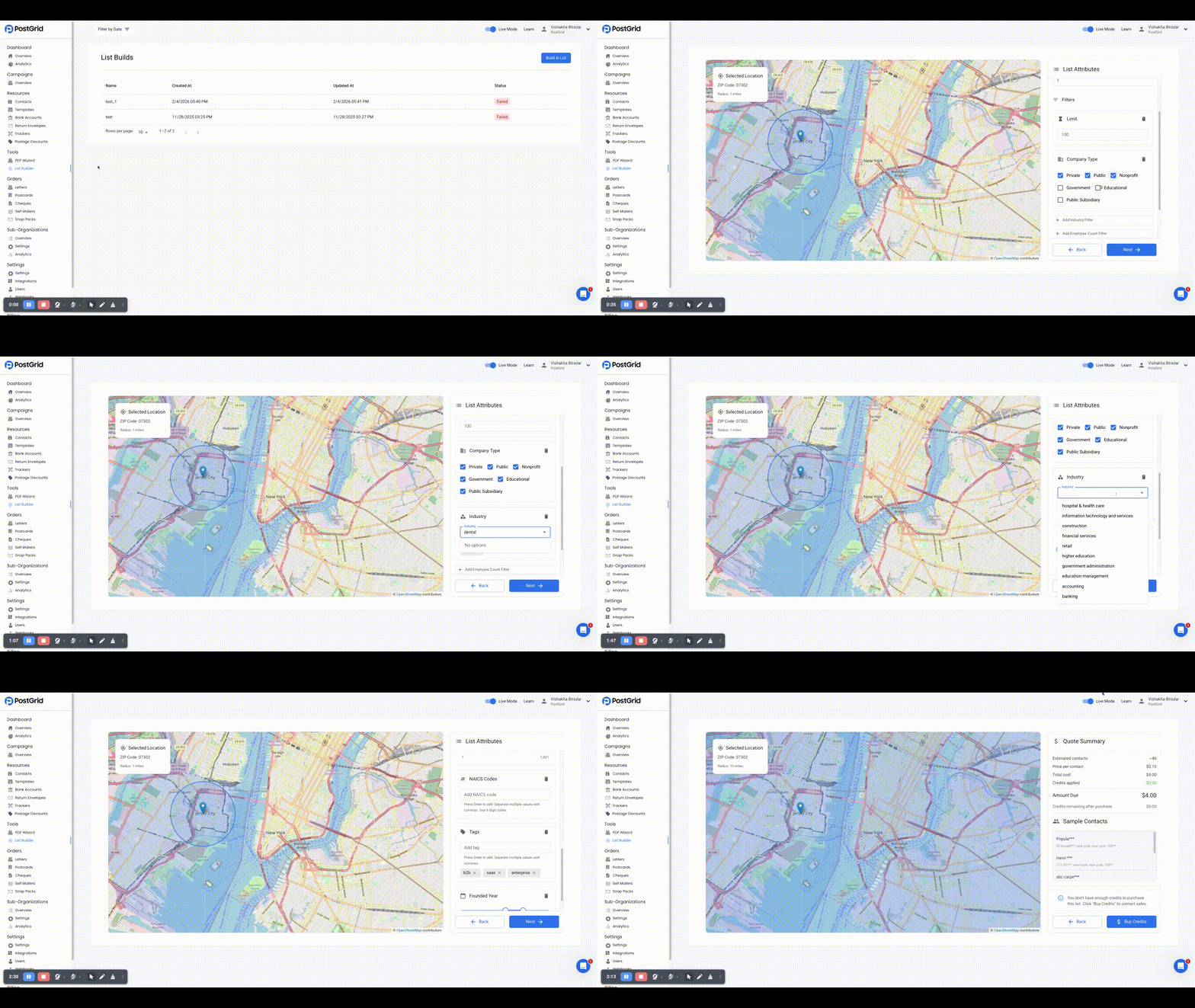
- In the Location field, enter an address, city, or ZIP code. The map will update to reflect your selection.
- Adjust the Radius (miles) to define the geographic area around your chosen location.
- Optionally apply any of the following filters:
- Limit: Set a maximum number of contacts for your list.
- Company Type: Filter by ownership structure (e.g., Private, Public, Nonprofit, Government, Educational).
- Industry: Search and select one or more industries to target (e.g., retail, financial services, hospital & health care).
- Employee Count: Set a minimum and maximum range for the number of employees.
- NAICS Codes: Enter specific NAICS codes to target businesses by their primary business activity.
- Tags: Enter relevant tags to further refine your audience (e.g., b2b, saas, enterprise).
- Founded Year: Set a range for the company's founding year.
- Click Next to generate your quote.
- Review the Quote Summary, which displays estimated contacts, price per contact, total cost, credits applied, and amount due. Sample contacts will also be shown.
- Click Purchase List to finalize and build your mailing list.
As part of the campaign flow
When creating a new campaign, select Build a list on the Mailing List step. This will take you through the same list-building steps outlined above. Once purchased, the list will be automatically associated with your campaign.
How do I get billed for it?
The List Builder operates on a credit-based system. Credits are only deducted from your account when you click Purchase List — not when the quote is generated.
The Quote Summary shown before purchase provides a full breakdown of:
- Estimated contacts
- Price per contact
- Total cost
- Credits applied
- Amount due
- Credits remaining after purchase
To use the List Builder, you will need to request credits from your Customer Success Manager or Account Executive. They will process your request, invoice you, or charge your payment method on file for the requested credits. These credits will then be added to your PostGrid account. As you build and purchase mailing lists, the appropriate number of credits will be deducted from your account based on the cost per contact and the total number of contacts in your generated list. If you do not have enough credits to cover the cost of the list, you will be prompted to purchase more credits.
FAQ
Q. Can I reuse lists I've built?
A. Yes. Any list you purchase is saved to your PostGrid account and can be reused in future campaigns by selecting Select a previous list on the Mailing List step during campaign creation.
Q. Are the contacts in the generated lists verified?
A. Yes. Contacts provided by the B2B List Builder are sourced from high-quality data providers.
Q. What's the difference between B2B and B2C list building?
A. The B2B List Builder targets businesses using firmographic filters like industry, company type, and employee count. The B2C List Builder targets individual consumers using demographic filters like age, income, and gender. See US Consumers with ZIP and Radius for more details.
Updated 7 months ago